
Author: huntgrav

  • Facebook Page vs Website: What a Service Business Needs

    Facebook Page vs Website: What a Service Business Needs

    “I don’t really need a website. I get all my work from Facebook and referrals.” We hear some version of that every month from roofers, groomers, pool guys and handymen around Sherman and Denison. So here’s our honest take on the Facebook page vs website question for a service business: you probably want both, but only one of them works for you when a stranger goes looking.

    And if the phone is ringing, why change anything? Because you can’t see the calls you never got.

    Facebook page vs website: what each one does for a service business

    Facebook is good at keeping you in front of people who already know you. Past customers, neighbors, the friend from church who shares your posts. Photos of a finished job, a quick note that you’ve got an opening Thursday. For that, it’s fine, and it’s free.

    It’s weak at the moment that matters most, when someone who has never heard of you needs the service you sell. Type “pest control Sherman TX” into Google and look at what comes back. You’ll see the map results, which come from Google Business Profiles, and then websites. A Facebook page turns up now and then, usually well down the page.

    You also don’t own the page. Meta decides who sees your posts, what the page looks like and which features exist next year. Most owners who post regularly have watched their reach shrink without changing a thing. And if the account gets hacked or locked, there’s nobody local to call.

    Then there’s the practical stuff a page just can’t do well: a separate page for each service, a list of the towns you cover, a quote form that lands in your inbox, answers to the questions customers ask before they call. A website does all of that, and it’s yours.

    Where new customers look first

    This matters more in Grayson County right now than it did a few years ago. Texas Instruments started production at its first new chip fab in Sherman in December 2025, and people keep moving here for those jobs and the ones around them. New residents don’t have a neighbor to ask yet. They don’t follow any local businesses on Facebook.

    So they search. They look at the map results, check the star ratings, and tap through to the website of whoever looks legit. If there’s no website at the end of that chain, a lot of them just pick the next listing.

    More of them are also asking ChatGPT, Gemini or Google’s AI Overviews. BrightLocal’s 2026 Local Consumer Review Survey found 45% of consumers had used AI tools for local recommendations, up from 6% a year earlier. Those tools build their answers from websites, business listings and reviews. Much of Facebook sits behind a login, which makes a page a thin thing to be recommended from. If you want to show up in those answers, a site with clear service pages is the starting point for AI search optimization.

    Phone on a kitchen counter surrounded by moving boxes, with a small red map pin of light floating above it

    What a service business website actually needs

    Not much, honestly. You don’t need animations or thirty pages. A clean site with a handful of the right pages will beat most of the competition in a town this size.

    Your services, spelled out

    “Plumbing services” tells nobody anything. “Water heater replacement, drain cleaning, slab leak repair and repiping for homes in Sherman, Denison and Pottsboro” tells the customer and Google exactly what you do and where. If a service makes you real money, give it its own page.

    Where you work

    Name the towns and counties you cover, and not only in the footer. The first question every caller has is “Do you come out to me?” Answer it before they have to ask.

    A phone number on every screen

    Put the number at the top of every page, make it tappable on a phone, and add a short form for people who won’t call. Don’t make anyone hunt.

    Proof

    • Recent reviews, quoted with the customer’s first name and town
    • Photos of your actual jobs and your actual trucks, not stock photos
    • License numbers, insurance, years in business
    • Who shows up at the door, with a photo if you’re comfortable with it

    It has to work on a phone

    Google now looks at the mobile version of your site when it decides where you rank; it finished that switch, called mobile-first indexing, in 2023. Most of your customers are on a phone too, standing in a flooded laundry room or looking at a dead AC unit. If the site is slow or you have to pinch and zoom, they’re gone.

    That’s the whole list. It’s where we start on every service business website we build, and most of what comes later is just adding a page when a new service or town earns one.

    “But I can’t afford a website”

    Fair. Cash is tight for a lot of small outfits, especially in the first few years. It’s the reason we offer a Website Lease: $500 a month with nothing upfront, so you aren’t writing a big check to get started. For a lot of trades, one or two extra jobs a month covers it.

    Whatever route you take, don’t let price be the reason you have nothing. If you want the full picture of what sites cost around here, we broke it down in how much a small business website costs in Texas.

    Keep the Facebook page

    None of this means you should delete it. Keep posting job photos and seasonal reminders there, and link those posts back to the matching page on your site. Put the website address in the page’s About section. Let Facebook do the job it’s good at, keeping people who know you from forgetting you, and let the website catch the people who don’t know you yet.

    One more thing: websites get stronger with age. Google trusts a site more once it has been around a while, collected some links and been kept up to date. The contractor down the road who launched two years ago has a head start that you can close, but only once you start.

  • Online Reviews: The New Word of Mouth for a Service Business

    Online Reviews: The New Word of Mouth for a Service Business

    Ask a service business owner around Texoma how they got their first customers and you’ll almost always hear the same thing: word of mouth. A neighbor tells a friend, the friend tells a coworker, and the schedule fills up. That still happens. But these days the neighbor usually ends with “just look them up,” and the looking up happens on Google. For a service business, online reviews are word of mouth now, written down where strangers can read it.

    Picture a July night in Sherman. The AC quits at 9 p.m. The homeowner isn’t calling around to neighbors. They open Google Maps, look at the star ratings, see who has plenty of reviews and a few from the last couple of weeks, read three of them, and call. Whoever gets that call probably didn’t earn it that night. They earned it over the previous year, one review at a time.

    Why online reviews are word of mouth for a service business now

    The best current numbers come from BrightLocal’s 2026 Local Consumer Review Survey. It found 97% of consumers read reviews for local businesses, and nearly half trust reviews from strangers as much as recommendations from people they know. The thresholds are stricter than most owners assume: 68% will only use a business with four stars or better, and 47% won’t use one with fewer than 20 reviews.

    The number we’d pay the most attention to is recency. 74% of consumers look for reviews written in the last three months. That’s what catches established businesses off guard. You can have 150 reviews and a 4.8, and still look half-closed if the newest one is from 2024.

    AI is in the mix now too. The same survey found 82% of consumers read AI-generated review summaries, and use of ChatGPT and similar tools for local recommendations jumped from 6% to 45% in a year. Those summaries are built from your reviews. Fewer and older reviews give the AI less to say about you, and it tends to recommend the businesses it can describe. That’s a big part of the AI search optimization work we do.

    And in a place like Grayson County, where new people keep moving in for jobs, reviews carry more weight still. A family that arrived last month doesn’t have a neighbor to ask.

    Where most service businesses go wrong

    The most common approach to reviews is no approach at all. The owner hopes happy customers will leave one on their own. A few do. Most never think about it again once the job is done. Meanwhile the one customer who had a bad day is plenty motivated, so the profile ends up shaped by the exception.

    The second mistake is silence: never thanking anyone for a good review, never answering a bad one. Customers notice. BrightLocal found 80% of consumers are likely to use a business that responds to all of its reviews.

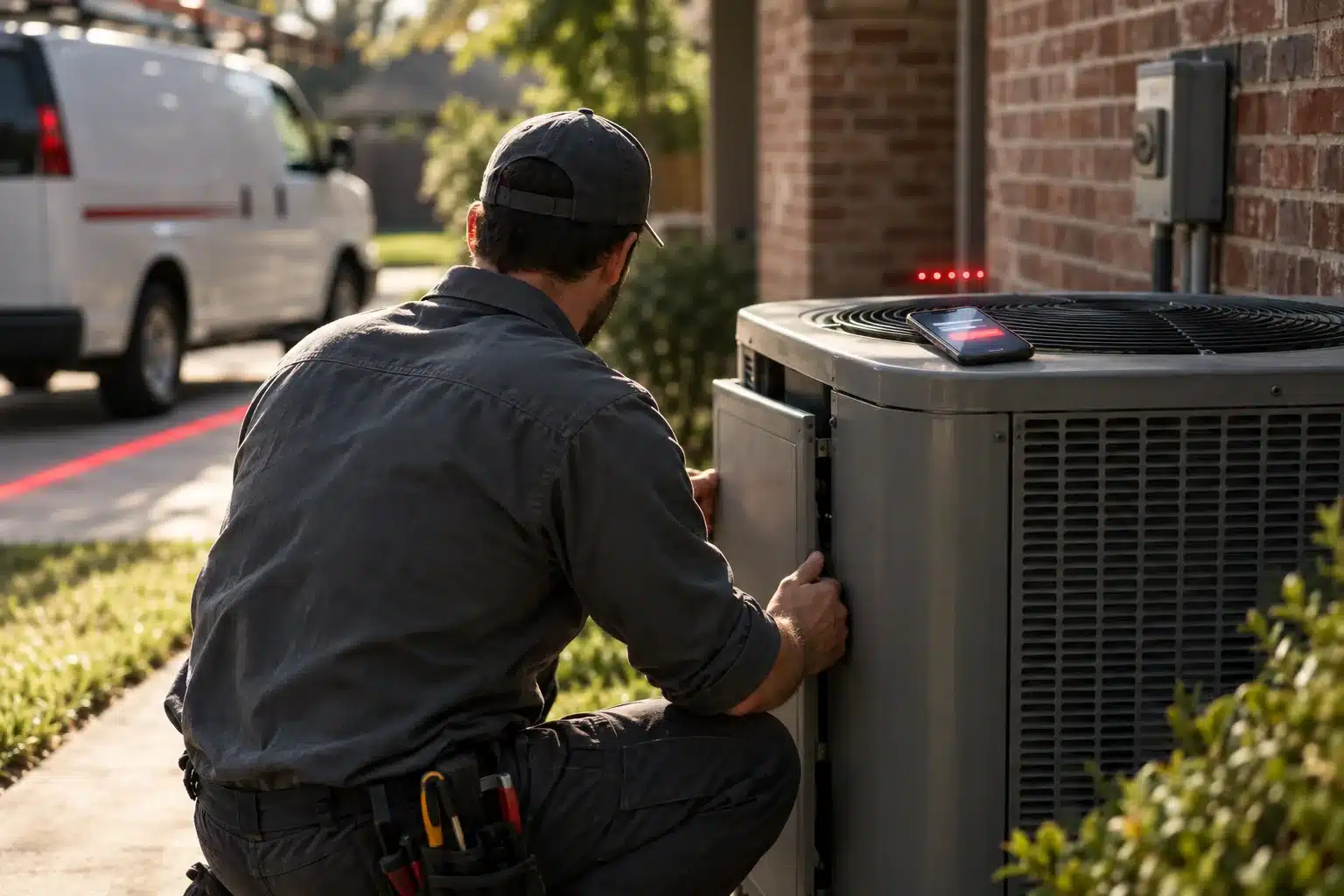
    HVAC technician closing up an outdoor AC unit beside a brick house, with a phone resting on top of the unit

    A review routine that fits a working week

    None of this takes much time once it’s set up. It just has to happen every week, which is where most owners stall.

    Ask every customer, every time

    Not the ones you think loved you. Everyone. The easiest way is a text within a few hours of finishing the job, with a direct link to your review form. You can get that link from your Google Business Profile under the option to ask for reviews. Something like this works fine:

    Thanks for having us out today. If you have a minute, a Google review helps a small business like ours more than you’d think: [link]

    Asking everyone matters for another reason. Google’s review policy doesn’t allow businesses to selectively ask only happy customers, a practice called review gating, or to pay for reviews with discounts or gifts.

    Answer every review

    For a good one, thank them by name and mention the job. “Thanks, Sarah. Glad we got the AC back on before the weekend heat” takes ten seconds and shows the next reader that a real person is paying attention.

    For a bad one, slow down. Reply once, briefly and calmly. Say what you’re doing about it and offer to take it offline with a phone number. Don’t argue the details in public, even if you’re right. People reading it are judging how you handle a problem more than the problem itself, and a level-headed reply to a one-star review can do more for you than another five-star one.

    Keep an eye on the other sites

    Google matters most for most local service businesses, but customers also review you on Facebook, Yelp, the BBB, Nextdoor and trade directories. Check them once a month and reply there too.

    Put your best reviews to work

    Quote them on your website, next to the service they’re about. Share them on social. Use them in Google Business Profile posts. A line from a real customer in Denison sells better than anything we could write for you.

    What steady asking looks like

    Cole’s Pest Control, a client of ours in Bossier City, Louisiana, had 32 Google reviews in late May 2026. By July they had 45, every one of them five stars. Thirteen reviews in about two months won’t make the news. It is enough to move a profile from “seems fine” to “these people are busy,” and it’s exactly the kind of recent activity that survey keeps pointing to.

    Your busy season is the best time to build this habit, whatever season that is for your trade. More jobs means more chances to ask.

    Don’t buy reviews

    This comes up more than you’d think, so plainly: don’t buy reviews, don’t have friends who never hired you leave them, and don’t pay a service that posts them from fake accounts. Google removes fake reviews and can restrict or suspend profiles caught doing it. The FTC also finalized a rule in 2024 banning fake reviews and the buying or selling of them, and it allows civil penalties against businesses that knowingly break it. The honest way is slower. It’s also the only one that doesn’t blow up on you.

  • Texas Instruments: A Texoma Service Business Opportunity

    Texas Instruments: A Texoma Service Business Opportunity

    On December 17, 2025, Texas Instruments started production at SM1, the first of the new chip fabs on its Sherman site, three and a half years after breaking ground in May 2022. TI plans up to four connected fabs there and expects as many as 3,000 direct jobs, plus thousands more at the companies around it. If you fix, clean, cool, mow or spray things for a living, that’s the Texas Instruments Texoma service business opportunity in one sentence: more people, more houses, more calls.

    We’re a little tired of the word “boom,” and a lot of what gets written about it is hype. But the arithmetic here is real, and it’s local. People who take those jobs need somewhere to live, and every one of those houses needs an AC tech, a plumber, a pest guy and somebody to mow the yard.

    Where the Texas Instruments opportunity reaches your service business

    Start with the people who just moved here. They don’t know anybody. They have no plumber, no electrician, no neighbor to ask. They find you the same way everyone new to a town does: a phone, a search box, and whatever shows up first.

    Then there’s the building itself. New subdivisions need everything installed and then maintained. Construction crews on long jobs need services too, and they stay for months. Existing homeowners tend to fix up and upgrade when the area around them is getting busier.

    And it isn’t a single wave. A site with room for four fabs gets built out over years, so demand keeps coming in pieces instead of all at once. That’s good news for a small business that can’t hire ten people in a quarter.

    The competition is coming too

    You aren’t the only one who has noticed. Expect companies based down US-75 in Collin County and Dallas to keep stretching their service areas north. Franchises look at the same growth numbers you do. And some of the local outfits that coasted on word of mouth for twenty years are finally putting money into their marketing.

    Our opinion: the businesses that come out ahead over the next few years won’t necessarily be the biggest or the cheapest. They’ll be the ones a new resident finds first and trusts fastest. A company from McKinney with a sharp Google profile will beat a better local company that’s invisible online, at least until the local one fixes it.

    Unmarked white service pickup in the driveway of a new brick home with fresh sod, with a small red map pin of light above the roof

    Four things to get right this year

    1. Your Google Business Profile

    For most service searches, the map results show up before any website does, and they come from Google Business Profiles. Fill in every field, pick the most specific categories, set your service area to the towns you actually drive to, add real photos, and post something at least every couple of weeks. If you’d rather hand it off, that’s what our Google Business Profile management covers.

    2. A website that shows up in more than one town

    Newcomers are landing all over the region, from Sherman and Denison to Van Alstyne, Howe and Pottsboro. A lot of businesses rank fine in their home town and disappear two exits down the highway. Usually the fix is a real page for each town you serve, with your actual work there, and a site that loads fast on a phone. We walked through it in why you rank in Sherman but not Denison.

    3. Reviews, on purpose

    A new resident has nothing to go on but your star rating and what strangers wrote about you. Ask every customer for a Google review with a direct link, and answer every review you get. It’s the cheapest marketing on this list and the one owners skip most.

    4. Answer the phone, and know where calls come from

    More visibility means more inquiries, and it means nothing if half of them go to voicemail and never get a call back. People with a broken water heater call the next name on the list. Our post on why whoever answers first wins the job goes deeper on that.

    Keep a simple lead log while you’re at it, even a spreadsheet: date, name, what they needed, how they found you, whether you booked it. After three months you’ll know which of the other three things is paying off.

    What we’d do if we owned a service company here

    We’d do the free stuff first. The Google Business Profile and a review routine cost nothing but time, and they’re where a new resident’s search starts. Then we’d fix the website, especially the service-area pages. Ads come last, once the profile and site are good enough that the clicks we pay for actually turn into calls.

    SM1 is already running, and TI’s own plans leave room for three more fabs on the same site. Whatever the pace of the rest of it, the people are already arriving, and they’re searching for someone to call.

  • RV Resort Digital Marketing Case Study: Sunset View

    RV Resort Digital Marketing Case Study: Sunset View

    Sunset View RV Resort is a few minutes from Lake Texoma in Kingston, Oklahoma. It has a pool, a pickleball court, a stocked fishing pond, a dog park and monthly sites, and it’s a short drive from several casinos. In other words, a good park that deserved more guests than it was getting from search. The owners handed us their website and search in October 2025. This RV resort digital marketing case study covers what we changed and what happened through the first half of 2026.

    The short version: booking revenue for January through June 2026 doubled compared with the same months of 2025.

    What we measuredResult
    Booking revenue, Jan-Jun 2026 vs. the same months of 20252x
    Clicks from Google search, Jan-Jun 20262.6x
    Times the resort appears in Google search40,000+ a month

    Where the resort started

    Plenty of guests found Sunset View the old-fashioned way. They drove past it, or somebody at the lake mentioned it. That works fine in July.

    It works a lot less in January. The weekend crowd thins out and a lake park lives on people who plan ahead: snowbirds, monthly guests, work crews on long jobs, couples booking a casino weekend. Those guests search before they drive. When they searched, the resort didn’t show up the way a park with its amenities should have, and the old website didn’t make a strong case once they got there. It didn’t clearly say what the park offered, who it was built for, or how to book from a phone.

    What we did

    Nothing exotic. Most of this is the same work any local business needs. It just had to fit the way RV travelers shop, which is on a phone, comparing three or four parks, often from the cab of a truck.

    A new website built around how guests book

    We rebuilt the site from the ground up. Different guests get pages that answer their own questions: weekend visitors, long-term and monthly stays, and crews who need a place to park near a job site. Amenities, rules, directions and things to do nearby sit where people expect them, and booking is one tap away on any page. That’s the approach behind every website we design: figure out who is actually searching, then give each of them a page.

    Local search

    We rewrote titles and page copy around the searches travelers really run, like RV parks near the lake, near the casinos, and monthly RV sites in the area, and built the new site so Google could read it cleanly: fast pages, clear headings, one topic per page. This is the slow, unglamorous part of local SEO. It’s also the part that compounds.

    Campground office counter with a paper site map, keys and a phone, and a small red map pin of light hovering over the map

    Google Business Profile and reviews

    For a campground, the map listing does a lot of the selling before anyone reaches the website. People see the photos, the star rating and the most recent reviews, and a lot of them decide right there. We cleaned up the resort’s Google Business Profile: categories, amenities, hours, current photos and regular posts. We also set up a routine for asking guests for reviews and answering the ones that come in, good or bad.

    If you want to do the profile work yourself, our guide to optimizing a Google Business Profile in 2026 walks through it field by field.

    The results

    Search moved first. Clicks from Google search grew 2.6x over January through June 2026, and the resort now shows up in Google more than 40,000 times a month. Those are people looking for a place to stay around Lake Texoma and seeing Sunset View in the results.

    Revenue is the number the owners care about, and it followed. Booking revenue for January through June 2026 was double what the same six months brought in during 2025. Those months include the slowest stretch of the year for a lake park, the same stretch where drive-by traffic used to dry up.

    What an RV resort digital marketing case study can and can’t tell you

    We’d be suspicious of any agency that took credit for every dollar of a doubling. Rates change. Weather changes. One rainy spring can wreck a season for everybody on the lake. What we can say is that far more people found the resort on Google, they landed on a site that made booking easy, and revenue rose over the same months.

    When you read any agency’s case study, ours included, check when the work started, what the comparison period is, and whether the results are the ones the owner would actually put on a bank deposit slip. Rankings for a handful of hand-picked keywords are nice. Revenue against the same months last year is better.

    What carries over to other seasonal businesses

    If you run anything seasonal around Lake Texoma, like a marina, a boat rental, cabins, an event venue or a guide service, the slow months are where marketing earns its keep. Summer customers find you anyway. Off-season customers plan, and planners search.

    • Give each type of off-season customer its own page. A monthly guest and a weekend guest ask completely different questions.
    • Keep your Google Business Profile current all year, with hours and photos that match the season.
    • Ask for reviews during your busy months, so the profile still looks active when things are quiet.
    • Watch search clicks and calls month over month. You’ll see which months need a push before the bank balance tells you.

    None of that requires a big budget. It does require somebody to keep doing it after the first month, which is usually where seasonal businesses fall off.

  • GEO vs SEO: Getting Your Local Business Into AI Answers

    GEO vs SEO: Getting Your Local Business Into AI Answers

    GEO vs SEO comes up in almost every conversation we have with owners now. People in Sherman and Denison have heard that customers are asking ChatGPT for recommendations, and they want to know whether the SEO they’ve been paying for still counts. It does. But the job got bigger.

    What SEO still does

    SEO (search engine optimization) is the work of getting your website and your Google Business Profile to show up when someone types a search. For a local service business, that mostly means two places: the map pack, which is the three businesses Google shows on a map near the top, and the regular results underneath it.

    The pieces haven’t changed much in years. Pages that say plainly what you do and where you do it. A site that loads fast on a phone. A Google Business Profile that’s filled out and kept current. Reviews. Links from other local sites. When someone searches “electrician Sherman TX,” that work decides whether they see you or the shop down the road.

    What GEO means

    GEO stands for generative engine optimization. The “generative engines” are the AI tools that write an answer instead of handing you a list of links: Google’s AI Overviews and AI Mode, ChatGPT, Gemini, Perplexity, Microsoft Copilot.

    Google has been moving this direction for three years. It tested AI answers as the Search Generative Experience in 2023, renamed them AI Overviews and rolled them out to US searchers in May 2024, then added AI Mode, a chat-style search, in 2025. By July 2025, Google said AI Overviews had more than 2 billion monthly users. That’s a lot of people reading an AI summary before they click anything.

    GEO is the work of getting your business named, quoted or linked inside those answers. If someone asks, “Who’s a good pest control company near Lake Texoma?”, you want to be in the paragraph that comes back.

    GEO vs SEO: where they actually differ

    Most of the difference comes down to what winning looks like.

    With SEO, you win a position. You’re second in the map pack or fifth on page one, and the searcher still does the choosing. With GEO, the AI does some of the choosing for them. It reads what it can find about local businesses, decides who fits the question, and names a few. Sometimes just one.

    That changes what matters. A search engine will rank a page that’s decent and stuffed with the right keywords. An AI model is looking for facts it can repeat with some confidence: what you do, where, how long you’ve been doing it, and what customers say about you. If those facts are vague, or they contradict each other from one site to the next, leaving you out is the easy call.

    The sources are wider, too. AI answers draw on your website, but they also lean on your Google profile, review sites, directories, local news and sometimes Facebook or Reddit threads. Your website is one witness among several.

    And it’s harder to measure. Google Search Console tells you which searches you appeared for and how many clicks you got. Nothing like that exists for how often ChatGPT mentions you. You can test it by hand, and paid tracking tools have started to show up, but the picture is rougher than what SEO reporting gives you.

    Blank paper cards, a map and a phone on an office desk in window light, connected by a thin red thread of light that meets in the center

    How to show up in AI answers

    Very little of this is exotic. Most of it is SEO done properly, with more attention paid to saying things clearly.

    1. Answer real questions on your site in plain sentences. “We repair and replace home HVAC systems in Sherman, Denison and Van Alstyne” is something an AI can quote. “Your comfort is our passion” is not.
    2. Give each main service its own page and name the towns you serve. One vague services page makes it hard for any system to match you to a specific question.
    3. Add schema markup. It’s a bit of code that labels your business name, address, hours, services and reviews so machines can read them. Customers never see it.
    4. Keep your Google Business Profile complete and current. Google’s AI answers to local questions pull from profile details and reviews.
    5. Get reviews that mention the job and the town. “They fixed our AC in Pottsboro the same afternoon” tells an AI far more than “Great service!”
    6. Make your name, address and phone number match everywhere: your site, Google, Bing Places, Apple Business Connect, Facebook, Yelp and the chamber directory. The AI tools don’t all read from Google.
    7. Earn mentions off your own site. A story in the local paper, a sponsor listing on a youth league page, a chamber membership. Those are the signals that tell an AI other people vouch for you.

    So do you need SEO or GEO?

    Both, and right now they overlap heavily. Everything on that list also helps your regular rankings. We haven’t seen a local business do well in AI answers while its basic SEO was a mess.

    Where we’d push harder than we did a few years ago is the writing. A lot of small-business sites were built to hit keywords, with sentences like “We are the best roofing company in Sherman TX for all your roofing needs.” That copy was never good. It’s worse now, because the reader on the other end is more and more often a model hunting for a straight answer.

    For a quick gut check, open ChatGPT or Gemini and ask for a recommendation in your trade and town, worded the way a customer would say it. Note who comes up and what the AI says about them. Then ask about your business by name. If the answer is thin or flat wrong, that’s your starting point. We go step by step through that test in our guide to getting your Texoma business found in AI search, and our AI search optimization work runs alongside regular local SEO for clients who want both handled.

  • Social Media Management for Local Businesses: What Works

    Social Media Management for Local Businesses: What Works

    Most owners we talk to in Sherman and Denison have a love-hate thing going with social media. They know their customers are on it. They also know a Facebook page whose last post went up in 2023 looks worse than having no page at all. Good social media management fixes that second problem without eating your evenings.

    The audience hasn’t gone anywhere. In Pew Research Center’s 2025 survey of U.S. adults, 84% said they use YouTube, 71% Facebook and 50% Instagram. So the people who need a plumber in Pottsboro or a stylist in Gainesville are scrolling the same feeds as everyone else. What matters is whether you show up there looking open for business.

    What social media management actually includes

    Posting is the part everyone pictures, and it’s maybe a third of the job. The rest is answering comments and messages, keeping hours and contact details right on every profile, keeping an eye on reviews and recommendations on Facebook, and checking once a month whether any of it turned into calls.

    If you only do the posting, you’ve put up a billboard nobody can talk to. People message businesses on Facebook and Instagram the way they used to pick up the phone. An unread message from a homeowner with a leaking water heater is a lost job, same as a missed call.

    Pick two platforms and keep them current

    You don’t need to be everywhere. For most Texoma service businesses, Facebook matters most. It’s where the neighborhood groups and the “who do y’all use for gutters?” threads live, and it’s where a lot of homeowners over 40 still spend their scrolling time. Instagram comes second if your work photographs well: landscaping, remodels, hair, food, detailing.

    Add YouTube or TikTok when you’re ready to make short videos, and not before. A dead TikTok account helps nobody. If you’re weighing it, we wrote a separate piece on short-form video for local businesses.

    Two accounts kept up beat five that went quiet in March.

    Post the things a franchise can’t

    The posts that do well for local businesses tend to be the plain ones. A photo of today’s job. The crew loading the trailer at 7 a.m. A backyard in Van Alstyne before and after. A 30-second answer to a question customers ask every week. Some ideas that hold up:

    • Finished work, with the town named in the caption
    • Your people, by first name
    • Seasonal reminders that help someone, like an AC check before the first 100-degree week or a pipe warning before a hard freeze
    • Answers to the questions you hear on every estimate
    • Local things you’re part of: the ball team you sponsor, the fundraiser at church, the booth at the county fair

    Skip the stock photos and the “Happy National Donut Day” graphics. People scroll right past them, and they make your page look like every other page. Meta Business Suite lets you schedule Facebook and Instagram posts for free, so you can batch a month of posts on a slow Tuesday afternoon and be done with it.

    Phone in a pickup truck dash mount showing message bubbles, a gloved hand reaching for it, with a house blurred through the windshield.

    Reply like it’s a phone call

    This is where most business pages fall apart. Someone comments “Do you service Bonham?” and it sits for four days. By then they’ve hired someone else.

    Make it a rule that comments and messages get answered the same business day. Turn on page notifications on one phone that somebody actually checks. Saved replies in Meta Business Suite handle the questions you get constantly (hours, service area, how to get a quote), and a personal line on top keeps them from sounding canned.

    Speed matters more than polish. We made the case in our piece on lead response time: the business that answers first usually gets the job, and a Facebook message is no different from a phone call.

    Negative comments get a reply too. Keep it public, calm and short, and offer to sort it out by phone. Deleting a complaint usually makes the person louder.

    Count calls, not likes

    Every platform will hand you reach and engagement numbers. They’re useful for seeing which posts people liked. They won’t tell you whether the phone rang.

    Some low-tech ways to tie social media to real customers:

    • Ask every new caller how they heard about you and write it down. A spreadsheet is fine.
    • When you share your website in a post, use a tagged link (a UTM link) so Google Analytics can show which visits came from Facebook.
    • Track message volume month to month. For some local businesses, Messenger brings in more leads than the website form does, and you won’t know until you count.
    • Open your page insights once a month. Not once an hour.

    If you’d rather have that tracked for you, our reporting shows who visited your site, how they found you and who called.

    Doing social media management yourself or hiring it out

    Plenty of owners run their own pages well. If you enjoy it, can find 45 minutes a week and take a decent photo on your phone, do it yourself. You know your customers better than any agency does.

    Hiring it out makes sense when the page goes dark every busy season, when nobody on staff owns the messages, or when you want steady posting and some video but don’t have the hours. Know the tradeoff going in. An outside manager needs your job photos, your stories and your quick answers to sound like you, and a good one will keep asking for them. If they never ask, you’ll get generic posts. If you’d rather hand it off, here’s how our social media management service works.

  • Web Design for Local Business: The 2 Things Most Sites Miss

    Web Design for Local Business: The 2 Things Most Sites Miss

    When a pipe bursts at 9 p.m. in Denison, nobody drives around looking for a plumber. They grab a phone, search, tap the first business that looks legit, and call. Good web design for local business is built around that moment, and most of the sites we look at in Texoma aren’t.

    They’re not ugly. Plenty of them look fine on the monitor in the office. The trouble is they fail at the two jobs that matter most for a local company: working on a phone, and helping Google (and now AI search tools) understand what you do and where you do it. Get those two right and most of the other decisions get easier.

    Secret one: design for the phone first

    We still see owners approve a new site by looking at it on a laptop. Your customers mostly aren’t on a laptop. They’re in a truck, a parking lot or a kitchen with a phone in one hand, and they want three answers fast. Do you do this? Do you work in my area? How do I reach you?

    Mobile-friendly in 2026 means more than shrinking the desktop version until it fits. These are the things we check first on a phone:

    • The phone number is tappable, visible without scrolling, and rings the right line.
    • The page loads in a couple of seconds on a normal cell signal, not just office Wi-Fi. Huge uncompressed photos are the usual culprit.
    • Buttons are big enough for a thumb.
    • Forms are short. Name, phone, what you need. Every extra field costs you leads.
    • Nothing pops up and covers the screen the second the page opens.
    • Your service area is stated in plain words near the top, something like “Serving Sherman, Denison, Pottsboro and Van Alstyne.”

    There’s a search reason for this too. Google crawls and indexes the mobile version of your site. If a paragraph or a whole page only shows up on desktop, as far as Google is concerned it isn’t there.

    Try this tonight. Pull up your own site on your phone, turn off Wi-Fi, and see if you can start a call to your business in under ten seconds. If you can’t, neither can a customer standing in two inches of water. And that customer isn’t going to try twice. The next listing is one thumb-scroll away.

    A hand holding a phone at a farmhouse kitchen table with a small glowing red map pin floating above it

    Secret two: web design for local business has to win local search

    The second miss is treating the website and your local search presence as two separate projects. They feed each other. When someone searches “roof repair near me,” Google leans heavily on your Google Business Profile for the map results, and it looks at your website to confirm what the profile says. ChatGPT, Gemini and Google’s AI Overviews work in a similar way when they recommend a local company. They pull from pages that say plainly what a business does and where. We dig into that side in how to get found in AI search.

    Four things make the biggest difference.

    A real page for each service and each main town

    One “Services” page that lists twelve things won’t rank for any of them. A page for water heater repair, another for drain cleaning, and pages for the towns you actually cover give search engines something specific to match. Write them for people: what the job involves, what to expect, which areas you serve. Copying the same paragraph six times with a different city name swapped in doesn’t count, and Google is good at spotting it.

    The same name, address and phone everywhere

    Your business name, address and phone number should read the same on your site, your Google Business Profile, Facebook, Yelp and any directory that lists you. “Suite 4” on one and “#4” on another is minor. An old phone number on half your listings isn’t. When the details disagree, Google has a harder time trusting any of them.

    A site and profile that tell the same story

    Your profile should link to the most relevant page on your site, usually the homepage or a location page. The site should match the profile on hours, services and service area. Keep the profile alive with fresh photos and replies to reviews. Our guide to optimizing your Google Business Profile walks through the settings that matter.

    Reviews where people make the decision

    People read reviews before they call. A few real ones on each service page, with the customer’s first name and town, answer the trust question right where someone is deciding. Use actual reviews you can point to. Made-up testimonials are easy to spot and they sink the whole page.

    What matters less than you’d think

    Owners tend to spend their energy on colors, fonts and whether the logo should be bigger. Those matter some. A clean, current look tells a visitor you’re still in business and take the work seriously. But we’ve never watched a local company lose calls because the blue was the wrong blue. We’ve watched plenty lose calls because the phone number was buried in the footer.

    A few things do earn their keep: real photos of your crew and your work instead of stock images, the padlock in the browser bar (an SSL certificate), and some way to tell where leads come from. If you can’t say whether this month’s calls came from Google, Facebook or the sign on your truck, you’re guessing about what works. Even a simple log by the phone beats nothing.

    A five-minute check of your local business website

    1. Open the site on your phone. Can you call in one tap from the top of the page?
    2. Search your main service plus your town. Do you show up in the map results, and does your website show up below them?
    3. Compare the hours and phone number on your site and your Google profile. Do they match?
    4. Count your service pages. Does each main job you do have its own?
    5. Ask ChatGPT or Gemini who does your kind of work in your town. Are you in the answer?

    Missing two or more usually means the site is costing you work. Some of these are quick fixes. Others mean the site sits on a template that was never built for a local company, and a rebuild designed around local search is cheaper over time than patching it. If the upfront cost is what’s holding you back, our website lease is $500 a month with nothing upfront, and it covers the build and the upkeep.

    Either way, start with the phone test. It takes a minute and it tells you most of what you need to know.

  • Connecting Marketing and Sales Data for Local Businesses

    Connecting Marketing and Sales Data for Local Businesses

    Most owners of local service businesses can tell you roughly what they spend on marketing. Far fewer can tell you which of those dollars turned into paying jobs. That gap between marketing and sales is where the money leaks. The truck wrap, the Facebook ads, the Google Business Profile, the chamber directory listing: something on that list is carrying the business and something else is dead weight, and until your marketing and sales numbers live in the same place, you’re guessing which is which.

    When you ran every job yourself, guessing worked. You answered the phone, you remembered that Mrs. Garcia’s neighbor sent her. Then you hired someone to run the office, added a second crew, and started letting calls roll to a cell phone while you were on a roof in Pottsboro. Your gut is still smart. It just isn’t in the room for most of those conversations anymore.

    What connecting marketing and sales data looks like in practice

    Strip away the jargon and it comes down to two facts recorded for every customer: how they found you, and what they ended up spending. If you have both for most of last year’s jobs, you can compare every channel on the only number that matters, which is revenue per dollar spent. You don’t need expensive software for this. A few free tools and one habit get you most of the way.

    Ask every caller, and write it down

    Start here because it costs nothing. Whoever takes a new inquiry asks “How did you hear about us?” and logs the answer. Then they ask one follow-up, because the first answer is usually vague. “Google” could mean the map listing, a paid ad, an AI answer, or someone who heard your name from a friend and searched it. “Facebook” could be your ad or a post in a Denison community group. A question like “Were you searching for us by name, or looking for a plumber in general?” separates word of mouth from search.

    Customers misremember. Plenty of people who found you on Google will swear a friend told them. That’s fine. The answers are still useful in aggregate, and the tools further down let you check them.

    Keep a simple lead log

    One row per lead. A shared spreadsheet is plenty. The columns we’d start with:

    • Date and how the lead came in (call, form, text, walk-in)
    • Name and phone number
    • Source, both what the customer said and what your tracking shows
    • The service they asked about
    • Quote amount
    • Won or lost, and the final invoice total

    Those last two columns are the whole trick. Most small businesses track leads in one place and revenue in another, and nobody ever lines them up. Put them on the same row and you can sort by source and see things like “Google Business Profile calls close more often than website form fills” or “the Facebook leads are real, but they’re all small jobs.” Those are the conclusions that should move your budget.

    Add one more column if you can stand it: how long it took to get back to the lead. A source that looks bad on paper is sometimes a source nobody called back until the next morning. We covered why that matters so much in the five-minute rule.

    Office counter with a desk phone, a clipboard of blank grid paper and a work van outside the window, linked by a thin red light line

    Put call tracking numbers where the phone rings

    For most service businesses the phone is still where the sale happens, and a phone call leaves no trace in your website analytics. Call tracking fixes that. Each source gets its own forwarding number: one on your ads, one on the website, one on the truck, one on the mailer. They all ring your normal line, and the report shows which number the customer dialed, when, and for how long.

    You can use a tracking number on your Google Business Profile too. Make it the primary number and list your main business line as the additional phone, so your listing still matches your number everywhere else online. Skip that step and you can muddy the consistency Google and AI tools use to trust your listing.

    Tag your links with UTMs

    UTM parameters are short tags stuck on the end of a link, like ?utm_source=facebook&utm_medium=paid&utm_campaign=spring-tuneup. When someone clicks a tagged link, Google Analytics records exactly where they came from instead of lumping them into “direct.” Google’s free Campaign URL Builder writes them for you, so there’s no need to memorize the format.

    Tag every link you control: social posts, ads, email newsletters, the QR code on a door hanger. And tag the website link on your Google Business Profile. Without it, clicks from your map listing usually show up as plain organic search, and you can’t tell how much of your traffic the listing is actually sending.

    Let GA4, Search Console and your Business Profile fill in the rest

    Google Analytics 4 tells you what visitors did on your site. Set up key events (Google’s current name for conversions) for form submissions, tap-to-call clicks and quote requests. Then the traffic acquisition report shows which channels produce those actions, which is far more useful than raw visits.

    Search Console shows the searches that put you in front of people. If “water heater repair Sherman” earns plenty of impressions and almost no clicks, your page title or description needs work. One catch that’s new in the last couple of years: Google counts clicks from AI Overviews and AI Mode in the same totals as regular results without breaking them out. Asking callers is still your best read on how many people found you through an AI answer.

    Your Google Business Profile has its own performance screen with calls, website clicks, direction requests, and the searches that showed your listing. For a lot of Texoma businesses this is the busiest front door they have, so it’s worth checking monthly and keeping the profile itself in shape. Our Google Business Profile management page covers what we do there.

    If you’d rather not stitch this together yourself

    Pulling numbers from four dashboards every month gets old fast. Our marketing analytics reporting puts it on one page: who visited, how they found you, and who called.

    Turn the numbers into a simple funnel

    Once the data exists, line it up in stages each month: people who saw you, website visits, leads, quotes sent, jobs won. You don’t need a fancy diagram. Five numbers in a row will do.

    Watch the rates between the stages. If leads jumped in April but jobs won stayed flat, the problem sits somewhere between the phone and the signed quote: slow follow-up, pricing, or a new hire who isn’t closing. If visits climbed and leads didn’t, look at the website. The funnel also settles the oldest argument in any small business, “the leads are junk” versus “nobody followed up,” with numbers instead of opinions.

    What to do after 90 days

    Give it a full quarter before you draw conclusions. Seasonal businesses may want longer. Then sort the log by source, add up won revenue for each one, and divide by what you spent on it. Cut or fix the bottom of the list and feed the top. If you’re not sure how big the pot should be in the first place, we wrote about setting a small business marketing budget.

    Go over the results with whoever answers your phone. They’ll spot things no report catches, like how many callers mention seeing your truck around Sherman before they ever looked you up.

  • Lawn Care Advertising: How to Fill Your Route in 2026

    Lawn Care Advertising: How to Fill Your Route in 2026

    Most lawn care advertising still looks the way it did ten years ago: a stack of door hangers, a magnet on the truck, maybe a Facebook post in March. Those still have a place. But the homeowner in Van Alstyne who needs a mowing service this spring is going to pull out her phone first, and what she finds in the next two minutes decides who gets the call.

    Lawn care also has an advantage most businesses don’t. Your customers live next to each other, they look at each other’s yards every day, and every stop you add to a street you already mow is close to pure margin. Good advertising for a lawn business plays to that.

    Lawn care advertising should build route density

    Before you spend a dollar, get clear on the goal. You don’t want customers scattered across Grayson County. You want ten yards on one street in Sherman instead of ten yards in ten towns. Drive time is the cost that quietly eats lawn companies, and every ad, sign and review request should push toward tighter routes.

    That changes how you judge results. A new customer forty minutes out is worth a lot less than one three doors down from your Tuesday stop. Some owners stop quoting outside a set radius during peak season. We think that’s smart.

    Your Google Business Profile does the most work

    When someone searches “lawn care near me” or “mowing service Denison,” the map results show up before any website. Those listings come from Google Business Profiles, and most lawn companies fill theirs out once and never look at it again.

    Go through yours and fix the basics:

    • Primary category set to the closest match for what you do (Lawn care service, for most of you), with landscaping or tree work added only if you really do it
    • A service area with the towns you actually want to work in. If you run the business out of your house, hide the street address
    • Each service listed on its own: mowing, edging, weed control, aeration, leaf cleanup, shrub trimming
    • Real photos from real jobs, added through the season instead of all at once
    • Hours, and a phone number somebody answers

    Google says its local results weigh relevance, distance and prominence, and your reviews feed prominence. A complete profile takes care of relevance. Keeping it current all year is most of what our Google Business Profile management does for service companies.

    Reviews close the sale before you ever talk

    A homeowner comparing three mowing services looks at the star rating, then at how recent the reviews are. BrightLocal’s 2026 Local Consumer Review Survey found 74% of consumers only care about reviews written in the last three months. A lawn company whose newest review is from two summers ago looks like it went out of business.

    So ask all season long, not in one burst in April. The best moment is right after a visit, when the yard looks its best. Text a direct review link that afternoon. Ask them to mention the service and their part of town if they don’t mind. “They’ve mowed our place in Pottsboro every week since April” does more for you than “great job.”

    Don’t trade a discount or a free mow for reviews. Google’s rules prohibit incentivized reviews, and it isn’t worth putting the profile at risk.

    Then answer every one. The same survey found 80% of consumers are likely to use a business that responds to all of its reviews. Two sentences is plenty. Skip the copy-and-paste reply. People notice.

    A lawn care worker mowing a front yard at midday while blank door hangers hang on the neighboring houses' front doors.

    Work the street you’re already on

    Your trailer parked on a street is an ad. Treat every job like one.

    After a new customer’s first service, hang something on the doors of the houses on either side and across the street. Keep it simple: what you do, that you already mow on their street, and how to get a price. A neighbor who watched you work that morning is about as warm as a lead gets.

    A few other things that still pay off:

    • Ask happy customers if you can leave a small yard sign for a week after a big cleanup
    • Give existing customers a credit for every neighbor who signs up, and write down who referred whom
    • Answer the “who do y’all use for mowing?” posts on Nextdoor and in local Facebook groups, and follow each group’s rules on self-promotion
    • Keep the truck and trailer clean and lettered with your number

    None of this is new. It works because every one of these builds the density you’re after.

    Give people a website that answers their questions

    Plenty of lawn businesses run on a Facebook page alone. That works until someone wants to know if you cover their town, whether you do one-time mows, or how your pricing works, and the answer isn’t anywhere. We wrote a whole post on why a Facebook page is not a website, and lawn care is a textbook case.

    Your site needs a page for each main service, the towns you cover, a plain explanation of how you price (per visit, monthly, or a season contract) and a short quote form. This is one form where asking for the street address makes sense, because you can measure most yards from satellite imagery and send a price without driving out. Customers like getting a number fast, and it saves you a trip.

    Cost is usually what holds owners back. Our Website Lease is $500 a month with nothing upfront, so you get a real site without writing a big check in February.

    AI answers are a new front door

    More homeowners now ask ChatGPT, Gemini or Google’s AI Overviews for a recommendation instead of scrolling a list of results. BrightLocal’s survey found the share of consumers using AI tools for local recommendations went from 6% to 45% in a single year.

    Those tools pull from your website, your Google profile, your reviews and directory listings. If your site says “Weekly mowing and seasonal cleanup in Sherman, Denison, Pottsboro and Howe” in plain words, an AI can repeat it. If it says “Your lawn, our passion,” it has nothing to work with. Our AI search optimization work comes down to that: plain, specific facts in the places these tools read.

    Paid ads, once the basics are done

    Google’s Local Services Ads have a lawn care category. They sit above the regular results and charge per lead instead of per click. Google checks out the business before the ads run and leans on your reviews, so they reward all the groundwork above. Facebook ads can work too, if you draw a tight radius around the neighborhoods you already serve.

    Timing matters more than budget. In North Texas people start thinking about their yards in late winter, when the weeds come up and spring signups begin. Ads that start in May are chasing people who already picked someone.

    Our honest opinion: don’t pay for ads while your profile has eight reviews and no photos. You’ll be paying for clicks that go look at your competitor.

    Keep the customers you already have

    The cheapest customer is the one who used you last year. Collect an email and a cell number at every signup. Send a short note in late winter to lock in the new season before anyone else asks them, and one more in fall for leaf cleanup or aeration.

    And ask every new caller how they heard about you. Write it down, even on a notepad in the truck. After one season you’ll know which of all this is paying, and you can quit doing the rest.

  • Case Study: Web Design and SEO for a Local Business

    Case Study: Web Design and SEO for a Local Business

    This is one of our earliest web design and SEO projects, for a local service company in the Sherman area that we’re keeping unnamed. We rebuilt their website around what their customers actually search for, and in less than a year they went from buried to Google’s local top three across the city. Their 2021 revenue more than doubled what it had been before they started working with us.

    Where they started

    Their problem is still the most common one we see. Before we worked together, you couldn’t find this company by searching for what they did. You could find them by searching their name, and that was about it.

    A search that includes your business name is a branded search. Those look great in a report because they convert well, but the people doing them already know you from a neighbor or from seeing your truck around town. Branded searches don’t bring in anyone new. The customers a growing business needs are the ones typing the service and the town into Google, who have never heard of you and are about to call whoever shows up first.

    Their site wasn’t built for those searches. It didn’t use the words customers used, and it didn’t give Google much reason to show it to anyone who wasn’t already looking for it by name.

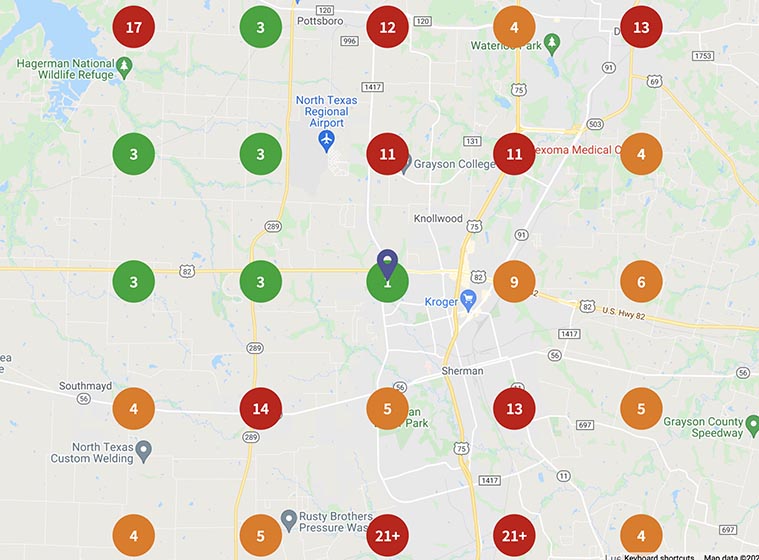
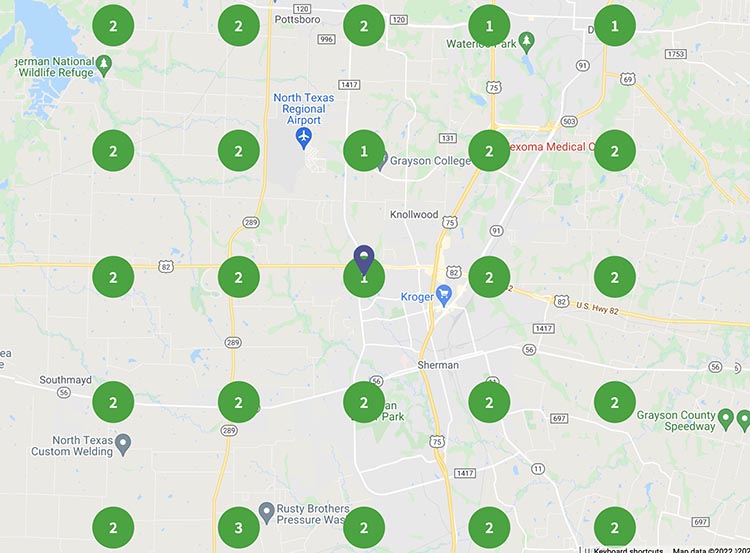
    The screenshot below is a rank grid. Each circle is a spot on the map around Sherman, and the number is where the company showed up in the local pack (the three businesses listed with the map) for a target search made from that spot. Green is top three. Orange is fourth through ninth. Red is tenth or worse. In April 2021 they were top three close to their own location and to the west. Across most of Sherman they were somewhere between ninth and past 21st, which for a local search means invisible.

    Map grid of Sherman, Texas showing the client's Google local pack ranking at each point in April 2021, with most points ranked 4th to 21st or lower
    Local pack rankings across Sherman in April 2021

    Web design and SEO done as one job

    We started with keyword research: what people in their service area typed when they needed this kind of work, and which of those searches had real volume. Then the site and its pages were built around those searches, so each one had a page that answered it.

    The target was the local pack. For a service business that’s the most valuable spot on the results page, because it’s where people tap to call. If the local pack is new to you, our SEO primer for small businesses explains how it works.

    We get asked a lot whether a business needs web design or SEO. In our experience the split is the problem. A good-looking site that doesn’t target any searches is a brochure nobody picks up. A keyword-stuffed site that’s confusing on a phone gets the click and loses the call. You need the design and the search work planned together, from the first page.

    The results

    By January 2022, less than a year after the April 2021 screenshot, the same grid looked like this:

    The same Sherman map grid in January 2022, with the client ranked 1st, 2nd or 3rd at every point
    The same grid in January 2022, less than a year later

    First, second or third at every point on the map. That covers the neighborhoods where they’d been ranking 13th and 21st the spring before.

    Rankings only matter if the phone rings, and it did. The company’s 2021 revenue more than doubled what it had been before they started with us. Marketing wasn’t the only reason. They did good work and answered the phone. But being findable by strangers was the missing piece, and it’s the piece we built.

    Person at a farmhouse kitchen table holding a phone, with a thin red line of light running from it out the window toward a pickup on a gravel road

    What we’d add if we started this project today

    The core of this project still holds up: rank for what customers search, in the places they search from. But local search in 2026 isn’t the same as it was in 2021, and a few things would be on the list from day one.

    The Google Business Profile gets as much attention as the site

    Back then, the website did most of the lifting. Now the Business Profile is often the first thing a customer sees, and sometimes the only thing. They see you in the map results, read a few reviews, and tap call without ever opening your site. Categories, services, photos and hours all feed that listing, so we’d set it up carefully and keep it current. Our Google Business Profile work is its own service for that reason.

    Reviews are part of the plan from month one

    Your review count, your rating and how recently people left reviews all show up right next to your name in the map results. Customers compare them before they call. We’d set up a simple, consistent way to ask every happy customer, starting in the first month instead of waiting until rankings improve. A text with a direct review link, sent the same day the job wraps, works better than any card left on the counter.

    AI answers sit on top of the results

    ChatGPT, Gemini and Google’s AI Overviews now answer a lot of “who should I call” questions directly. Those tools lean on sites and listings that say plainly what a business does and where it works. A site organized around specific services and towns, which is what this one was, has a head start. We’d also make sure the business name, address and phone number match everywhere those tools look.

    It’s all on a phone

    Most people searching for a local service are on a phone, often in a hurry, sometimes standing in a wet kitchen. A tap-to-call button, a page that loads fast on cell data and a contact form you can fill out with one thumb matter more than how the homepage looks on a desktop monitor. We’d design for the phone first and check the desktop second.

    Knowing which searches pay

    We’d track the source of every call and form fill from the start, even if that just means asking each new customer how they found you and writing it in a notebook. Once you know which searches and pages bring in paying work, you know where the next dollar goes. You also find out which pages aren’t pulling their weight, which is just as useful when it’s time to add to the site.

    Try the test we’d run first

    Pick up your phone, open a private browser window, and search for your main service and your town without your business name. Then drive to the other side of town and search again.

    If you’re not in the map results either time, you’re about where this company was in April 2021.